Permits & plan review
Online or office applications, automatic routing to zoning, building and fire review, corrections, and one-click permit issuance with required inspections created for you.
One system for your building department: online applications, plan review, fees, inspections, fire safety schedules, operating permits and complaints — with your state and Census reports compiled for you.
Choose your state to see availability and how Towpath handles your state's requirements.
State building codes ask every municipality to track permits, inspections, certificates, stop-work orders, complaints, periodic fire safety inspections and operating permits — and many states require an annual report on all of it.
Most small towns and villages do that with a part-time code officer, paper files, spreadsheets, or desktop software that hasn't changed in years. Enterprise systems are priced and built for big cities.
Designed for small municipalities — simple enough for a part-time office, complete enough for compliance.
Online or office applications, automatic routing to zoning, building and fire review, corrections, and one-click permit issuance with required inspections created for you.
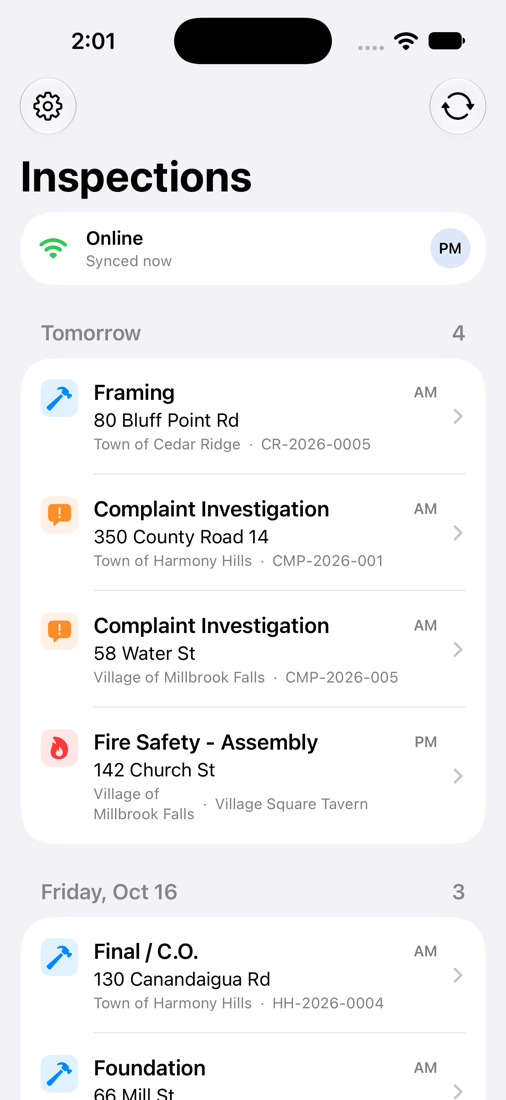
Inspectors get their route on an iPhone with checklists, photos and on-site signatures. No signal? Keep working — results upload automatically when you're back in range.
Every assembly space, multiple dwelling and commercial building on its required cycle, with overdue and due-soon alerts so nothing slips.
Track hazardous-use, public assembly and seasonal permits, expiration dates and renewals in one list.
Log complaints, schedule investigations, issue and print notices of violation and orders, and keep a full case history.
Your state's annual report figures and the Census Bureau's monthly building permit survey (C-404), compiled automatically from your records.
Fees calculated from your fee schedule. Record checks and cash, or let applicants pay online.
Building permits, Certificates of Occupancy and Compliance, and violation notices — generated and ready to print or email.
Residents and contractors apply, check status and request inspections online — fewer phone calls for your clerk.
Every state runs building code enforcement its own way. Towpath is set up state by state, with the permit types, inspection cycles, forms and reports your state requires.
| Part 1203 area | How Towpath handles it |
|---|---|
| Building permits | Applications, plan review, fees, issuance and expiration tracking |
| Construction inspections | Required inspections created per permit type; results with checklists and photos |
| Stop-work orders | Issue, track and lift — flagged on the inspector's phone |
| Certificates of Occupancy / Compliance | Issued only when required inspections pass; printable certificate |
| Fire safety & property maintenance inspections | Recurring schedules by occupancy type with overdue alerts |
| Operating permits | Issuance, conditions, expiration and renewal tracking |
| Complaints | Intake, investigation, notices and orders, resolution |
| Truss-type construction | Flagged on permits and checked at final inspection |
| Recordkeeping | Complete history and audit trail for every permit, property and case |
| Annual report to the Department of State | Figures compiled automatically, with a printable summary |
Towpath helps you meet these requirements; your code enforcement officer remains responsible for code determinations.
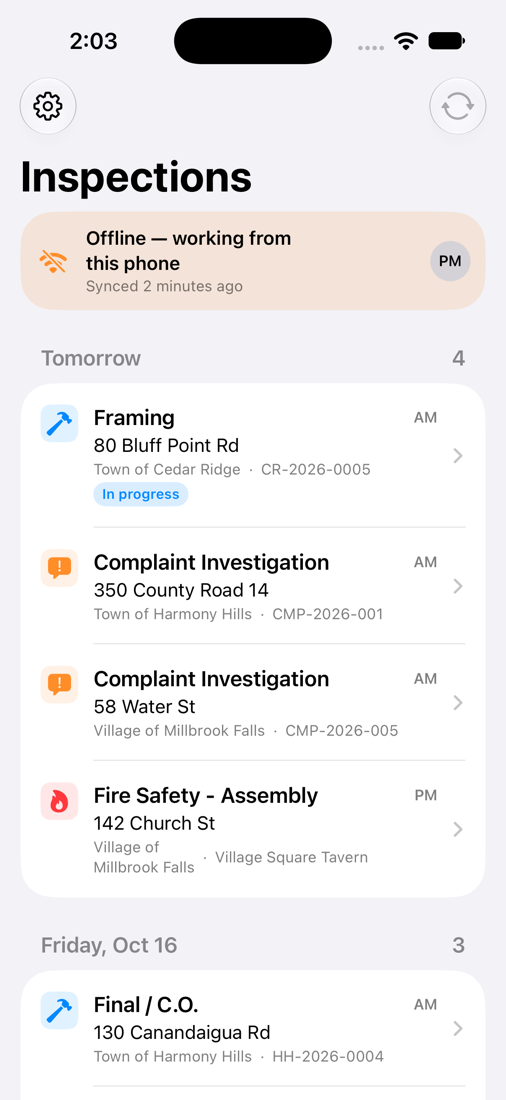
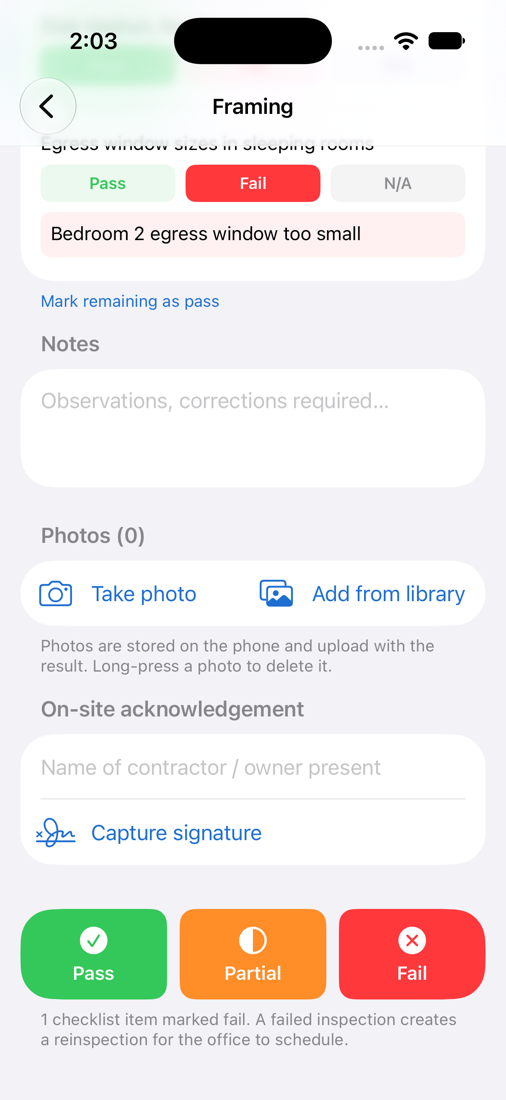
Rural areas don't always have a signal. The Towpath iPhone app downloads the day's inspections with checklists, permit details and inspection history at the address — so inspectors can work anywhere.
In many small communities, one code officer covers a town and its villages — or several municipalities at once. Towpath keeps each municipality's fees, permit numbers, documents and reports separate, while the officer sees one combined schedule.
Shared-officer arrangements get a multi-municipality discount.
Applicants and contractors pay permit, inspection and operating-permit fees by card or bank transfer from the public portal. Funds go directly to your municipality's bank account through our payment partner — Towpath never holds your money.
Online payment processing is billed at our payment partner's cost plus a small platform rate, set out in your agreement and itemized on a monthly statement.
Online payments are optional. Many towns start with check and cash only and add online payments later.
We're partnering with a small group of towns, villages and townships to shape Towpath. Founding municipalities get the full product free for 12 months — with setup and data migration included.
Limited spots for the 2027 building season. Pilots start on your schedule — winter setup is ideal.
Unlimited staff users, the iPhone app, the public portal, setup and support — all included. No long-term contracts.
Population under 2,500
$2,400/year
Population 2,500 – 10,000
$4,800/year
Population 10,000 – 25,000
$8,400/year
🤝 Shared code officer? Each additional municipality served by the same officer is discounted.
🧾 Priced to fit within most small municipalities' purchasing thresholds — check your procurement policy.
💳 Optional online payments: processing at our payment partner's cost plus a small platform rate, itemized monthly. How it works
🎁 Founding municipalities pay nothing for the first year. See the pilot
Nothing happens automatically. Before your year ends we'll review how it went with you. If you want to continue, you move to the annual plan for your population at founding-member pricing. If not, you keep a complete export of your records.
Yes. The day's inspections, checklists and property details are stored on the phone. Results, photos and signatures save on the device and upload automatically when a connection returns.
That's exactly what Towpath is designed for. Each municipality keeps its own fees, numbering, documents and reports, and the officer works from one combined schedule.
Yes. We import from spreadsheets and common formats as part of setup, and load parcel data from your county's real property records.
No. Towpath runs in a web browser and on iPhone. We handle hosting, updates and backups.
Each municipality gets its own account with our payment partner, linked to your bank. Payments are deposited to you directly on a regular schedule; Towpath never holds municipal funds. Processing and the platform rate are itemized on your monthly statement.
You do. You can export all of your records at any time, during the pilot or after.
Permit checklists include a step to confirm the third-party electrical certificate is on file before final inspection.
Use the state menu at the top of the page. It shows which states are available now and which are coming soon, and lets you request Towpath for your state.
See Towpath with your own municipality's permit types in 20 minutes — online, or in person at your town hall.